
FIELD NOTES / ORIGINAL 3D DEMO
Every Last Grain Controls
WASD movement, left-click digging, E interaction, P menu and Esc mouse release for the original desktop demo.
Main keys
| Input | Action |
|---|---|
| WASD | Move |
| Mouse | Look after clicking into the game |
| Shift | Sprint |
| Left mouse or hold E | Dig while aiming at sand |
| E | Use, sell or buy at an interaction prompt |
| J | Open the Journal: Skills, Areas, Collection and Records |
| Q | Use an unlocked ability; see the skill requirement below |
| P | Open the game menu |
| Esc | Release the mouse; may leave fullscreen |
P and Esc do different jobs
The developer's Update 2 explicitly moved the menu to P. Esc leaves fullscreen and closes open windows. If you are following an older controls card, that distinction explains why Esc may not show the menu you expected.
J opens the Journal, which contains Skills, Areas, Collection and Records. P opens the game menu for settings, saving and other menu actions. Use J to check Lot Edge progress or your finds rather than looking for those tabs in P.
When browser focus changes, click the game again to resume looking. Clicking a guide in another tab does not mean the game has lost its save.
Recover the mouse view
If the mouse pointer leaves the game or looking stops after you click another tab, return to the game and click inside its picture. Update 3 explicitly added a reminder for this action. If the game still does not respond, check whether a menu is open before reloading.
Settings → Controls
Press P, open Settings and select CONTROLS. We checked the official Update 19 demo on November 28, 2026: its Controls screen lists SHIFT: Sprint, J: Journal, Q: Ability and LMB / E: Dig (hold). These are present in the current demo. The screenshot shows bindings, not a key-remapping interface.
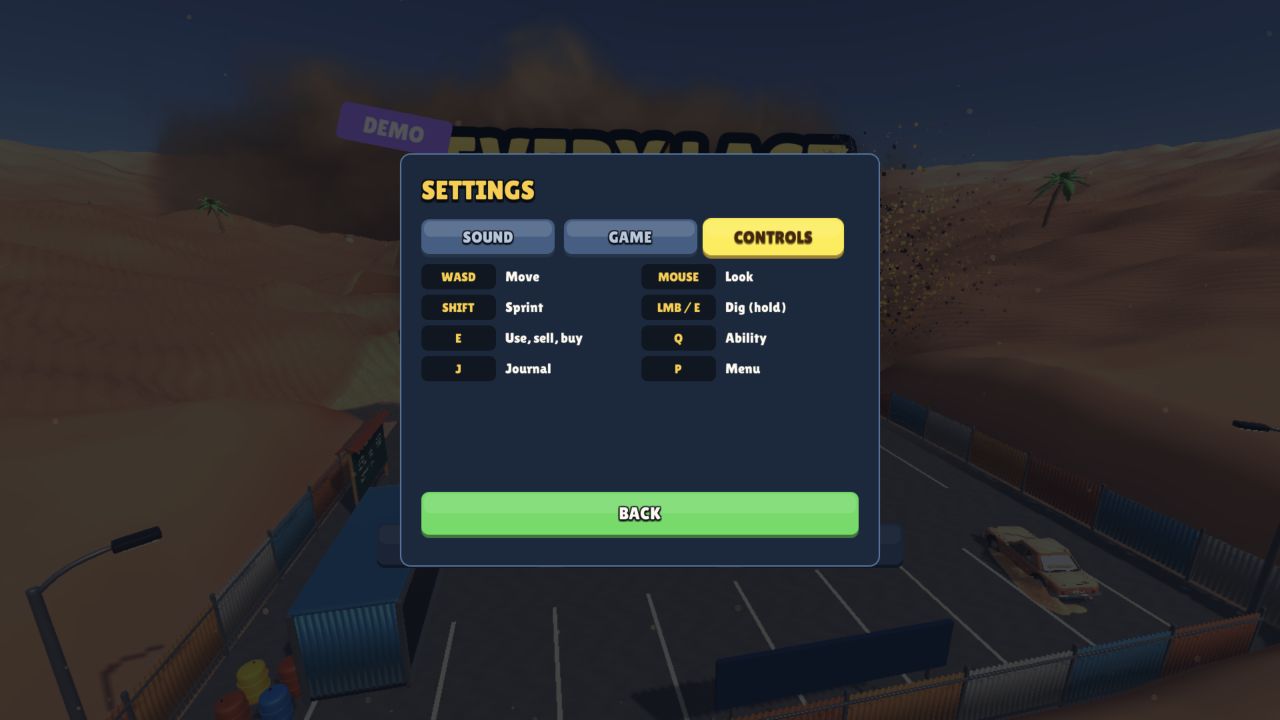
Q ability and the sandstorm replay are different actions
Q is an ability key, so the relevant skill must be unlocked before you can use that ability. The author's Update 10, dated November 22, 2026, explicitly documents the Sandstorm ability card showing Q after learning it. This confirms the binding by Update 10; it does not establish which earlier update first introduced the skill.
The sandstorm option in the P menu refills a cleared lot for a replay. That menu action, the Q skill ability and future full-game area announcements should not be treated as the same feature. See Every Last Grain completion and replay. Shift is verified in Update 19, but the reviewed devlogs do not identify its introduction date.
Fullscreen and switching tabs
Esc can leave fullscreen and release the pointer. Re-enter fullscreen using the game's available fullscreen control, then click back inside the game to look around. Changing focus does not itself tell you whether a save succeeded; check Every Last Grain save progress before closing the tab or deleting browser data.
Why older key cards differ
Update 2 moved the menu binding from Esc to P. Some promotional key cards still show Esc for the menu, so follow the current in-game Controls tab. The developer also confirms that holding E can dig as an alternative to the mouse button in a reply to Thalatash. E also serves interaction prompts, so pay attention to what you are facing.
Source: Update 2. For the first digging and selling cycle, see how to play Every Last Grain. For low frame rates or an unresponsive view, use Every Last Grain performance help.